
Smart Gallery Pro - Quick Pic
Smart Browser, Photo Gallery, QR Scanner, ColoringPhotography
4.0107.00 Reviews
- Version
- 2.1.0
- Installs
- 10.00K
- Age Rating
- Everyone
Screenshots
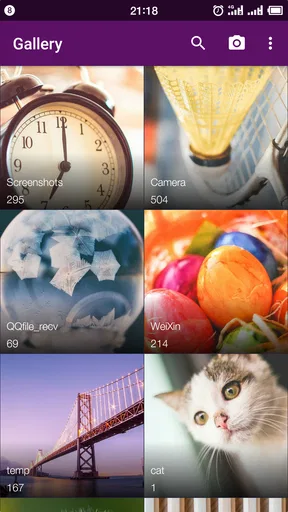
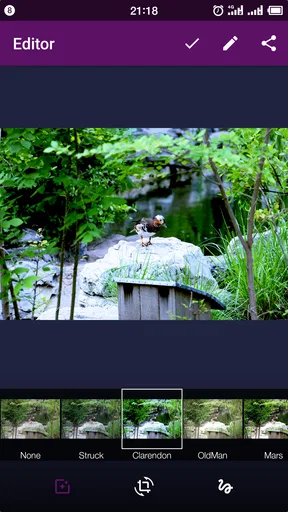
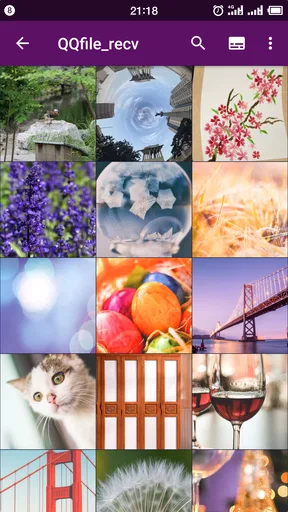

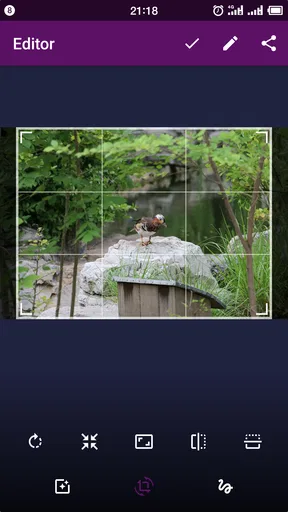
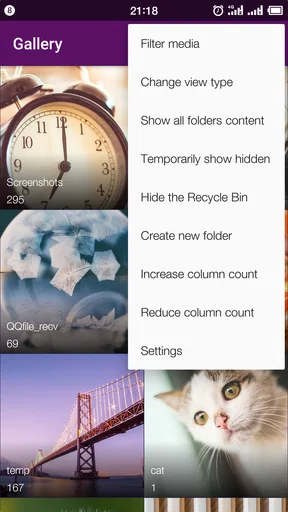
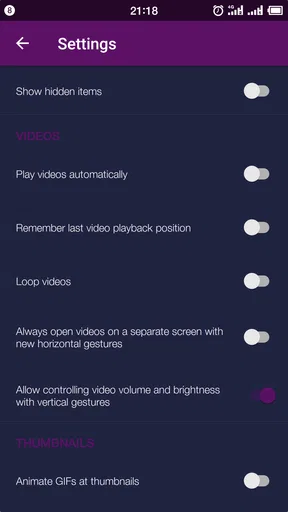
Our Review of Smart Gallery Pro - Quick Pic
 Analysis by Appyee
Hey there, fellow app enthusiasts! Today, I'm diving into the world of photo management with Smart Gallery Pro - Quick Pic. If you're like me, you probably have thousands of photos scattered across your phone, and sometimes, finding that one perfect shot can feel like searching for a needle in a haystack. So, let's see if this app can help us organize and enjoy our photo collections more efficiently.
When a gallery becomes part of the creative process
A photo gallery is easy to overlook when you think about making something creative. Yet the work does not stop when I take a picture: I still need to find the right frame, decide which shots belong together, and get a clean version ready to share. That is the practical role I look for in a gallery app. Smart Gallery Pro is aimed at keeping photos and videos accessible, rather than replacing a dedicated camera or a full editing studio.
That distinction matters if you are choosing between the gallery already on your phone and another download. The built-in option is usually the simplest place to browse recent pictures, while a separate gallery can be worthwhile when you want more control over how a growing collection is arranged. I would consider this app when albums and day-to-day sorting are the problem; I would not install it expecting a complete professional photo workflow.
A realistic use case is preparing a small set of pictures after a family gathering. I might want to separate the useful group shots from blurry attempts, keep the children’s pictures apart from images intended for a shared message, and make a modest adjustment before sending anything. A gallery that makes those steps easy can save time without turning a casual task into a project. It is that sort of everyday convenience, rather than a long list of creative effects, that should guide a decision here.
First Impressions and Setup
The first thing I noticed about Smart Gallery Pro - Quick Pic is its clean and intuitive interface. Upon opening the app, I was greeted with a straightforward layout that made navigation a breeze. The setup process was seamless, and within minutes, I had the app up and running, ready to tackle my photo library.
The app is a photography utility from Smart Browser, Photo Gallery, QR Scanner, Coloring. It costs $2.99, carries an Everyone age rating, and its current release is version 2.1.0 for Android 5.0 and later. Those details make it a paid choice rather than a free replacement you can casually test without spending anything, so I would first ask whether the built-in gallery already handles the way I sort and revisit pictures.
Once installed, the app quickly scanned my device for images and sorted them into albums. This initial organization was quite impressive, and it saved me a lot of time. Who knew my phone had so many hidden gems?
Building albums around actual work
One of the standout features is the ability to create custom albums. This is perfect for someone like me who loves categorizing memories by events or themes. Whether it's a trip to the beach or a family gathering, creating an album is as simple as a few taps. The drag-and-drop functionality makes rearranging photos within albums a snap.
For a more useful routine, I would create albums around the next action, not just the subject: “select for printing,” “send to relatives,” or “keep for a project.” That small change makes the gallery part of a creative handoff. It also helps avoid the trap of making an album for every minor occasion and then forgetting which one contains the image I need. A few purposeful collections are easier to maintain than dozens of near-duplicates.
There is a trade-off to that approach. Albums help me make a shortlist, but they do not automatically solve the harder editorial choice of which image is strongest. I still need to compare near-identical shots and make the final call myself. If I regularly need batch selection rules, detailed metadata filtering, or a managed library shared across several devices, I would look at a more specialized photo-management system instead of assuming a phone gallery can cover those jobs.
Making quick edits without losing momentum
Another cool feature is the built-in photo editor. No need to switch apps to make quick edits; you can adjust brightness, contrast, or apply filters right within the gallery. It’s like having a mini Photoshop at your fingertips. This feature really shines when you want to spruce up an image before sharing it on social media.
I see the editor as a finishing touch for a picture I have already chosen, not a substitute for a dedicated editing app. A quick brightness correction can help a dim indoor photo read better on a phone screen, while a filter can give a set of casual images a more consistent feel. The practical tip is to make one restrained adjustment, then compare the result with the original before sharing. Small screens can make a heavy edit look convincing until you view the image elsewhere.
For a creator, that boundary is useful: select and tidy here, then move to a specialist tool if the image needs careful retouching, layered work, or a precise export. I would not build an elaborate edit on the assumption that a gallery editor offers the same depth as a full photo suite. The convenience is fewer app changes for simple fixes; the cost is that advanced control belongs elsewhere.
Keeping personal and shareable pictures separate
In today's digital age, privacy is a big deal. I was pleased to find out that Smart Gallery Pro - Quick Pic takes this seriously. The app offers a password-protection option for your private albums, which ensures that your personal photos remain just that—personal. It's reassuring to know that those embarrassing childhood photos are safe from prying eyes.
I would treat a private album as a useful everyday barrier, not as a reason to stop thinking about privacy. Before handing my phone to someone to browse holiday pictures, I would still check what is visible in the main gallery and close anything I do not want them to see. A practical habit is to keep intended-to-share selections in a separate album and review that album before showing it, rather than relying on memory in the moment.
This is especially relevant for people who use one phone for family life and creative work. A photographer showing a client a few finished images may not want unrelated personal pictures mixed into the same browsing session. Album separation helps make that interaction less awkward, though anyone needing a formal client-delivery system should use a dedicated sharing or proofing service instead.
Browsing a large library and finding the right frame
Performance-wise, the app is a beast. It handles large collections with ease, and I didn't experience any lag or crashes during my testing. Scrolling through thousands of photos was smooth, and the search functionality is spot-on. You can search by date, location, or even custom tags, which makes finding that specific photo a piece of cake.
Search is most helpful when I have a rough clue before I start: the approximate day, where I took the picture, or a tag I chose earlier. For future retrieval, I would add a small number of consistent custom tags to images I know I will need again, such as a project name or “reference.” Tags only pay off when I use the same wording each time; switching between several labels for the same idea makes searching less reliable. This is a modest organization habit, not a replacement for an automatic image-recognition library.
There is also a sensible exception: a search field cannot rescue a collection that has no useful dates, locations, or tags to narrow it down. If I am sorting years of unlabelled photos, I would start with a manageable recent period or one event, then build the habit as I go. Trying to organize everything in one sitting is a good way to abandon the task halfway through.
One thing that particularly impressed me was the app's ability to handle high-resolution images. Whether you're dealing with DSLR-quality shots or 4K videos, the app processes them without a hitch. It’s clear that the developers put a lot of effort into optimizing the app for speed and efficiency.
Handling mixed media and choosing the right handoff
The app also supports a wide range of file formats, which is a huge plus if you're dealing with more than just JPEGs. It effortlessly manages RAW files, GIFs, and even BMPs. This level of compatibility is rare in gallery apps, making it a versatile choice for photography enthusiasts.
- Supports various image formats
- Easy integration with cloud storage
- Customizable themes and layouts
Additionally, Smart Gallery Pro - Quick Pic integrates smoothly with cloud services, allowing you to back up your precious photos with ease. No more worrying about losing your pictures if your phone takes an unexpected plunge into the pool.
For an actual handoff, I would use the gallery to find and prepare the images, then check the destination app or service before sending. A gallery is the staging area, not necessarily the whole delivery chain: a social post, a message to family, and a client-ready collection each have different needs. I would also keep an original copy before making edits or sharing a reduced version, particularly when the picture might later be used for a print or another project.
Cloud integration can make a backup routine more convenient, but I would not treat the word “cloud” as a guarantee that every album is safely copied or available offline. Before relying on any backup for an important trip or job, I would check that the files I care about can actually be retrieved from the service I use. That quick verification is more useful than assuming a gallery’s connection to cloud storage means every part of the workflow is automatic.
Who should choose it—and who should keep looking
This is a better fit for someone who wants a dedicated place to browse, sort, and make quick adjustments on an Android phone, especially if the standard gallery feels limiting. The store shows an average rating of 4.0 from around 1.1 thousand ratings, with 10 thousand or more installs and 107 written reviews. That gives a prospective buyer some adoption context, but I would weigh it less heavily than whether the album and editing workflow matches my own habits.
I would skip it if I only need a basic camera-roll viewer, do nearly all editing on a computer, or expect advanced retouching and professional asset management. The $2.99 price makes the choice more deliberate than trying a free built-in app, and the app is for Android rather than iOS. Someone who switches between an Android phone and an iPhone should not assume that the same gallery workflow will follow them across both platforms.
It is also worth separating a gallery from a backup plan. If my main concern is protecting irreplaceable family photos, I would want a backup setup I can verify independently, rather than relying on album organization alone. If my main concern is making a polished image, I would choose a specialist editor. This app’s strongest case is the middle ground: keeping a phone library easier to browse and making small edits without opening a separate tool.
Final Thoughts
After spending some quality time with Smart Gallery Pro - Quick Pic, I'm genuinely impressed. Its combination of user-friendly design, robust features, and speedy performance makes it a standout choice for anyone looking to organize their digital photos. Whether you're a casual snapper or a seasoned photographer, this app has something to offer.
If you're tired of scrolling endlessly through your photo library and want a more organized, efficient way to manage your images, give this app a shot. Trust me, your future self will thank you when you can actually find that perfect sunset photo without a headache!
Happy organizing, and may your galleries always be clutter-free!
Verdict
Strengths of Smart Gallery Pro - Quick Pic
- Fast and smooth user interface.
- Advanced photo editing tools.
- Supports multiple image formats.
- Secure with privacy protection.
- Easy cloud backup integration.
Limitations of Smart Gallery Pro - Quick Pic
- No built-in social sharing options.
- Limited video format support.
- Ads in free version can be intrusive.
- No face recognition feature.
- Lacks collaborative album creation.
Similar Picks in This Category
View All
Google Photos
Google LLC4.4

Gallery
Google LLC4.2

Picsart AI Photo Editor, Video
PicsArt, Inc.3.9

B612 AI Photo&Video Editor
SNOW Corporation4.1

BeautyPlus-Selfie Photo Editor
PIXOCIAL TECHNOLOGY (SINGAPORE) PTE. LTD.4.5

Remini - AI Photo Enhancer
Bending Spoons4.1
Frequently Asked Questions
What features does Smart Gallery Pro - Quick Pic offer?
Smart Gallery Pro - Quick Pic provides a range of features including photo and video organization, customizable folders, a photo editor, and the ability to hide private images. It supports multiple formats and offers cloud backup for easy access and storage. The app also boasts a user-friendly interface with fast browsing capabilities.
Is Smart Gallery Pro - Quick Pic safe to use for storing private photos?
Yes, Smart Gallery Pro - Quick Pic offers robust security features to protect your private photos. It includes a secure vault where you can hide sensitive images. The app supports password protection and encryption, ensuring that your private media remains secure from unauthorized access.
Does Smart Gallery Pro - Quick Pic support cloud storage?
Smart Gallery Pro - Quick Pic supports cloud storage, allowing users to back up their photos and videos to services like Google Drive and Dropbox. This feature ensures your media is safely stored and can be accessed anytime, anywhere, even if you switch devices or lose your phone.
What are some potential drawbacks of using Smart Gallery Pro - Quick Pic?
While Smart Gallery Pro - Quick Pic offers many features, some users may find its advanced options overwhelming. Additionally, the app may require in-app purchases for certain premium features, which could be a downside for those seeking a completely free solution. It's important to check compatibility with your device as well.
Is Smart Gallery Pro - Quick Pic customizable to user preferences?
Yes, Smart Gallery Pro - Quick Pic is highly customizable. Users can personalize folders, themes, and the overall layout of the app. The photo editor also allows for a variety of editing options, enabling users to enhance their photos according to personal taste and style preferences.
